


In an era where data fuels business success, Microsoft’s Power BI has emerged as a transformative force, seamlessly blending Artificial Intelligence (AI) to elevate data analytics to unprecedented heights. This dynamic integration empowers organizations to move beyond static reports, unlocking deep insights, predicting future trends, and driving strategic decisions with remarkable precision. AI in Power BI is not just a tool—it’s a revolution that enables businesses, from nimble startups to global conglomerates, to harness their data as a competitive advantage. In this comprehensive exploration, we delve into the intricate workings of AI in Power BI, its transformative features, real-world applications across industries, and a detailed roadmap to help you leverage this technology to propel your organization forward.
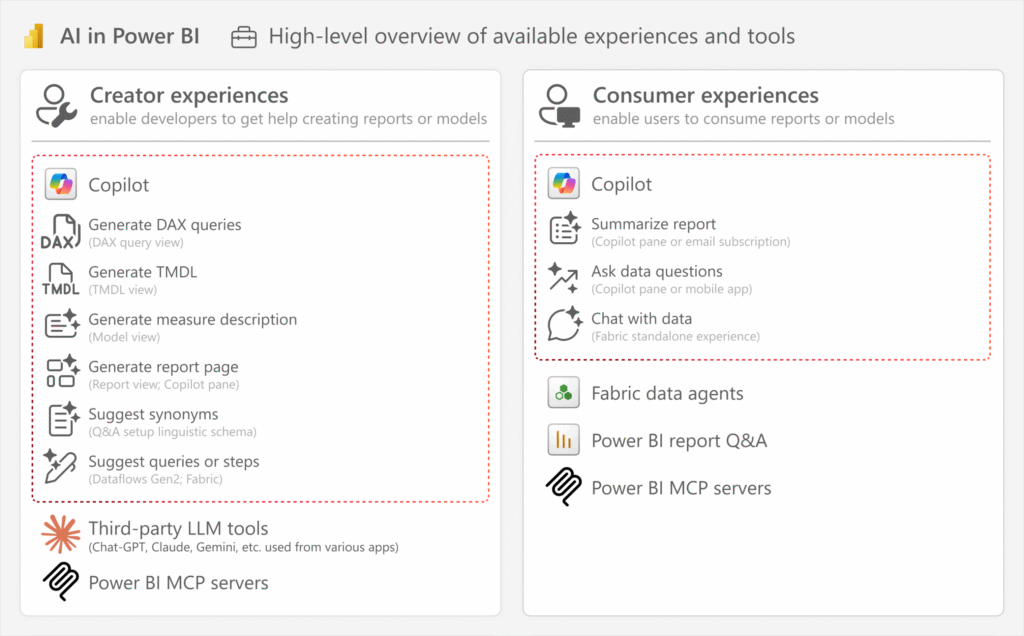
Power BI has long been a cornerstone of business intelligence, renowned for its ability to transform complex datasets into intuitive visualizations. The infusion of AI takes this capability to a new echelon, enabling businesses to uncover hidden opportunities, anticipate challenges, and act with agility. By combining cutting-edge machine learning, natural language processing (NLP), and predictive analytics, Power BI delivers a suite of tools that democratize advanced analytics, making them accessible to everyone from data novices to seasoned analysts.
AI in Power BI redefines how organizations interact with their data, offering a range of benefits that streamline processes and amplify impact:
Automated Insight Discovery: AI sifts through vast datasets to identify trends, correlations, and anomalies, eliminating hours of manual analysis.
Predictive Power: Advanced algorithms forecast future outcomes, enabling businesses to plan proactively and mitigate risks.
Conversational Data Access: Users can query data using everyday language, receiving instant, visually rich responses that simplify decision-making.
Scalable Performance: AI processes massive datasets in real-time, ensuring insights remain relevant even as data volumes grow.
Ecosystem Synergy: Seamless integration with Microsoft’s ecosystem (Azure, Office 365) and third-party platforms creates a unified analytics environment.
These advantages position AI in Power BI as an indispensable tool for organizations seeking to thrive in a data-driven landscape. Let’s explore the specific AI features that make this possible, diving into their functionality and transformative potential.
Power BI’s AI capabilities are meticulously designed to simplify complex analytics while delivering profound results. These tools empower users across skill levels to extract actionable insights, predict trends, and communicate findings effectively. Below, we provide an in-depth look at each feature, enriched with practical examples and their impact on business outcomes.
The Key Influencers visual is a game-changer, leveraging sophisticated machine learning algorithms to analyze datasets and pinpoint the most critical factors driving specific outcomes. Whether you’re investigating customer retention, sales performance, or operational bottlenecks, this tool identifies key drivers and presents them in an intuitive visual format, complete with detailed explanations of their impact. For example, it can reveal why certain customer segments are more likely to churn or what factors boost product sales.
Real-World Example: A national retail chain used Key Influencers to analyze sales data across 200 stores. The tool identified store location, promotional campaigns, and staff training levels as the top drivers of revenue. By focusing marketing efforts on high-impact regions and enhancing training programs, the chain achieved a 15% increase in sales and a 10% boost in marketing ROI within three months.
The Q&A feature revolutionizes data exploration by allowing users to ask questions in plain, conversational language. Queries like “What were our top-performing products in Q2?” or “Which regions showed the highest growth in 2024?” trigger instant visualizations, such as bar charts, line graphs, or tables, tailored to the question. This feature empowers non-technical users—executives, managers, or frontline staff—to engage with data directly, reducing dependency on data teams.
Real-World Example: A global logistics company implemented Q&A to monitor its supply chain operations. Managers could ask, “Which routes experienced delays this week?” and receive real-time visualizations pinpointing problem areas. This enabled rapid interventions, reducing delivery delays by 25% and improving customer satisfaction scores by 8% in six months.
Power BI’s AutoML feature democratizes predictive analytics by enabling users to build custom machine learning models without coding expertise. Whether you need to classify customers, perform regression analysis, or forecast trends, AutoML guides users through the process of selecting data, training models, and deploying predictions. This makes advanced analytics accessible to businesses without dedicated data science teams.
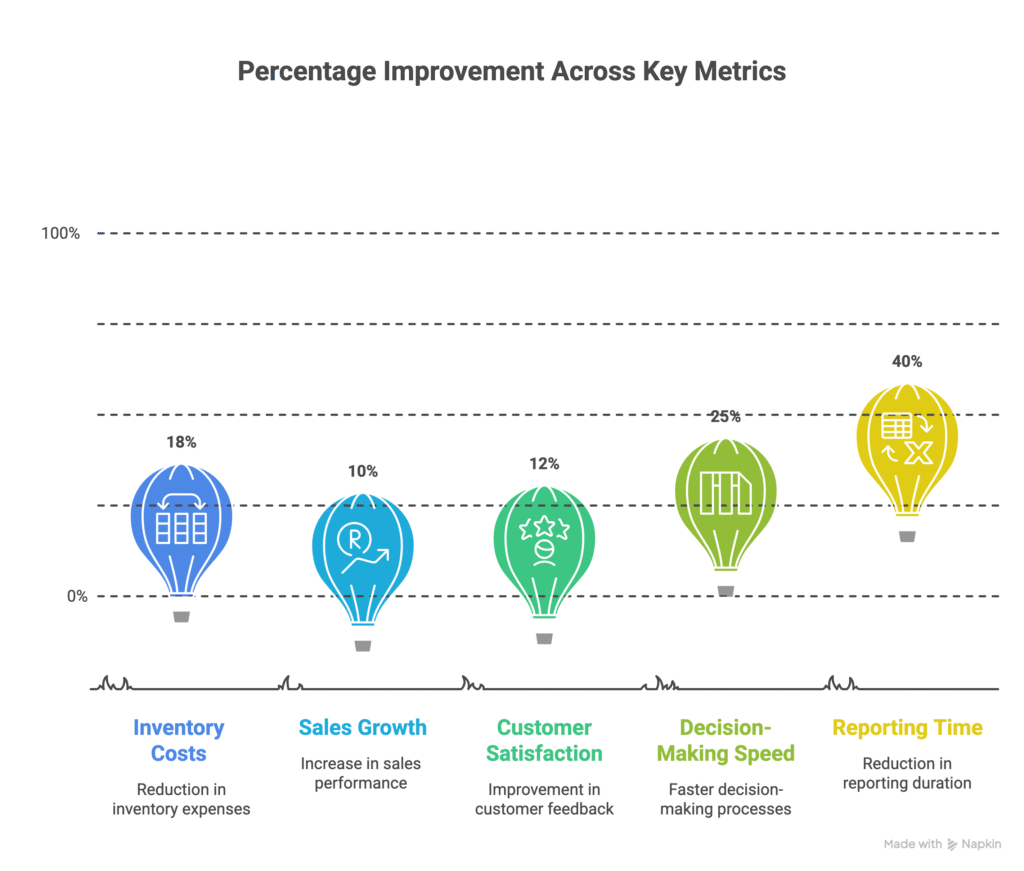
Real-World Example: A mid-sized manufacturing firm used AutoML to predict inventory demand based on historical sales, seasonal patterns, and market trends. The resulting model achieved 90% accuracy, enabling the company to optimize stock levels, reduce overstock costs by 18%, and eliminate stockouts during peak seasons, boosting operational efficiency.
By integrating with Azure Cognitive Services, Power BI offers advanced AI capabilities, including text analytics, image recognition, and sentiment analysis. Sentiment analysis, for instance, can evaluate customer feedback from surveys, reviews, or social media to gauge brand perception, while text analytics extracts key themes from unstructured data, such as support tickets or emails.
Real-World Example: A luxury hotel chain used sentiment analysis to evaluate thousands of guest reviews. The insights revealed that slow check-in processes and inconsistent Wi-Fi were major pain points. By addressing these issues, the chain improved guest satisfaction scores by 12% and increased repeat bookings by 7% within a year.
Smart Narratives automatically generate written summaries of data insights, translating complex trends and patterns into clear, professional prose. This feature eliminates the need for manual report writing, providing stakeholders with concise, easy-to-understand summaries that highlight key findings.
Real-World Example: A financial services firm used Smart Narratives to create executive summaries for quarterly performance reviews. The automated reports highlighted revenue trends, cost drivers, and customer acquisition metrics, reducing reporting time by 40% and freeing analysts to focus on strategic initiatives.
AI in Power BI is driving transformative outcomes across diverse sectors, from retail to healthcare to logistics. Below, we explore detailed case studies that showcase its impact, highlighting the challenges addressed, solutions implemented, and results achieved.
A mid-sized retail chain with 150 stores faced persistent challenges with inventory imbalances, leading to overstock costs and missed sales opportunities. Using Power BI’s AutoML, the company developed a demand forecasting model that analyzed sales data, regional trends, seasonal patterns, and external factors like holidays. The model predicted inventory needs with 90% accuracy, enabling the chain to optimize stock levels. As a result, they reduced inventory costs by 20%, increased sales by 10% due to better product availability, and improved supply chain efficiency.
A regional hospital network sought to reduce patient readmissions, which were driving up costs and affecting care quality. Using AI Insights, specifically the Key Influencers visual, the hospital analyzed patient data to identify risk factors for readmissions, such as medication non-compliance and lack of follow-up care. By implementing targeted interventions, including automated reminders and telehealth check-ins, the hospital reduced readmissions by 15%, improved patient outcomes, and lowered operational costs by 8%.
A financial institution managing a large loan portfolio needed to mitigate default risks. Using Key Influencers, the company analyzed borrower data to identify key predictors of defaults, such as credit scores, payment history, and debt-to-income ratios. The insights enabled the institution to develop personalized repayment plans and early warning systems, reducing defaults by 10% within a year and saving millions in potential losses.
A logistics company with a global fleet struggled with delivery delays, impacting customer satisfaction. By implementing the Q&A feature, managers could query real-time data on driver performance, route efficiency, and weather impacts. For example, asking “Which routes had delays today?” generated instant visualizations, enabling rapid adjustments. This reduced delivery delays by 20%, improved on-time delivery rates, and boosted customer satisfaction by 10%.
A digital marketing agency used Azure Cognitive Services’ sentiment analysis to evaluate customer feedback across social media platforms. By analyzing thousands of comments and reviews, the agency identified positive and negative sentiments, uncovering key themes like product quality and customer service. This informed more targeted campaigns, resulting in a 15% increase in engagement rates and a stronger brand presence.
To fully capitalize on AI in Power BI, organizations must adopt a strategic, disciplined approach. Below, we outline detailed best practices to ensure successful implementation and sustained value.
Begin by defining specific, measurable goals, such as reducing operational costs, improving customer retention, or forecasting revenue. These objectives guide the selection of AI tools and ensure alignment with strategic priorities. For example, a retailer aiming to optimize inventory should prioritize AutoML for demand forecasting.
AI thrives on high-quality data. Invest time in cleaning datasets, removing duplicates, correcting errors, and filling gaps. Power BI’s Power Query tool simplifies data preparation, ensuring your AI models generate accurate, reliable insights.
Leverage user-friendly features like Q&A and Key Influencers for immediate impact. These tools require minimal setup and deliver quick wins, building confidence in AI adoption across your organization.
Provide comprehensive training to ensure all users, from executives to analysts, can leverage AI features effectively. Focus on practical use cases, such as using Q&A for ad-hoc queries or interpreting Key Influencers for strategic decisions. Regular workshops and hands-on sessions accelerate adoption.
AI models and dashboards are dynamic tools that require ongoing refinement. Regularly update them to incorporate new data sources, improve predictions, and align with evolving business needs. Schedule quarterly reviews to assess performance and identify opportunities for enhancement.
Maximize Power BI’s compatibility with Microsoft Azure, Office 365, and third-party platforms like Salesforce or SAP. This creates a cohesive analytics ecosystem, enabling seamless data flow and enhancing AI’s impact across your organization.
Track key performance indicators (KPIs) to measure the impact of AI in Power BI. For example, monitor reductions in reporting time, improvements in forecast accuracy, or increases in customer satisfaction to quantify ROI.
To illustrate the power of AI in Power BI, we’ve created detailed visualizations and tables based on real-world outcomes. These can be recreated in Power BI to showcase your own data’s potential.
AI Feature | Business Benefit | Example Outcome | Industry | Time to Impact |
|---|---|---|---|---|
Key Influencers | Pinpoints critical drivers of outcomes | 15% increase in marketing ROI | Retail | 3 months |
Q&A | Enables conversational data queries | 25% faster decision-making | Logistics | 1 month |
AutoML | Simplifies predictive modeling | 18% reduction in inventory costs | Manufacturing | 2 months |
Cognitive Services | Enhances text and sentiment analysis | 12% improvement in customer satisfaction | Hospitality | 4 months |
Smart Narratives | Automates professional report generation | 40% less time spent on reporting | Finance | 1 month |
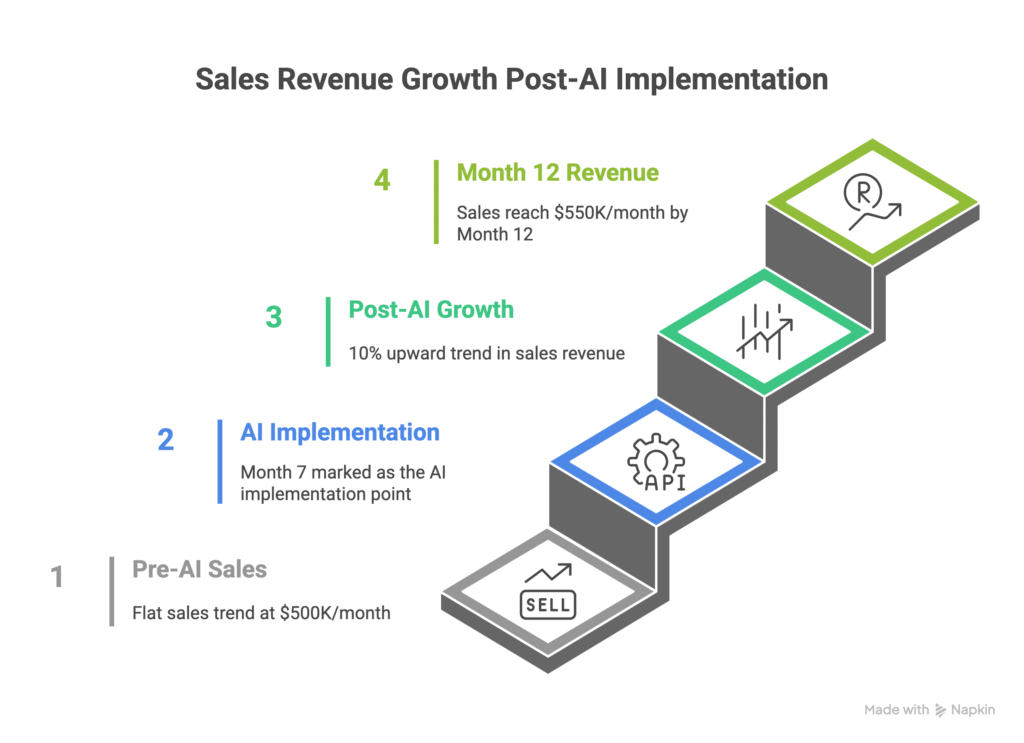
In today’s data-driven world, businesses thrive on their ability to transform raw data into actionable insights with speed and precision. Microsoft’s Power BI, a leading business intelligence platform, has long empowered organizations with robust visualization and reporting tools. The integration of Artificial Intelligence (AI) and the introduction of Model Context Protocol (MCP) servers for both Power BI and Microsoft Fabric have elevated these platforms into strategic powerhouses. These advancements enable organizations to uncover deep insights, predict trends, and interact with data conversationally, all while leveraging secure, scalable connections to their data ecosystems. This comprehensive guide explores how AI, combined with Power BI and Microsoft Fabric MCP servers, is reshaping data analytics, offering detailed insights into their features, real-world applications, and practical steps to harness their potential.
Power BI has redefined business intelligence by making data visualization accessible and intuitive. Microsoft Fabric, an all-in-one analytics platform, extends this capability by unifying data lakes, warehouses, and real-time analytics. The integration of AI into both platforms, coupled with MCP servers, introduces a new paradigm where users can interact with data using natural language, automate complex analyses, and control their analytics environments with unprecedented ease. MCP servers, built on the open-standard Model Context Protocol, enable secure, two-way connections between large language models (LLMs) and data sources, allowing AI to perform actions like querying, updating, or managing Power BI and Fabric resources.
AI in Power BI and Microsoft Fabric, enhanced by MCP servers, delivers transformative benefits:
Conversational Control: Users can manage workspaces, datasets, and dashboards using natural language, streamlining workflows.
Automated Insights: AI identifies trends, anomalies, and key drivers without manual intervention.
Predictive Analytics: Advanced algorithms forecast outcomes, enabling proactive strategies.
Real-Time Data Access: MCP servers provide up-to-the-second data interactions, critical for dynamic environments.
Scalable Integration: Seamlessly connects with Microsoft ecosystems (Azure, Office 365) and third-party tools, ensuring flexibility.
These capabilities make AI and MCP servers essential for organizations aiming to stay competitive. Let’s dive into the core AI features and the role of MCP servers in Power BI and Microsoft Fabric.
Power BI and Microsoft Fabric leverage AI to simplify analytics and deliver powerful insights. MCP servers enhance these platforms by enabling LLMs to interact directly with data sources, execute actions, and manage resources. Below, we explore the key AI features and how MCP servers amplify their impact.
The Key Influencers visual in Power BI uses machine learning to analyze datasets and identify factors driving specific outcomes, such as customer churn or sales growth. It presents clear, actionable insights with visual explanations. MCP servers extend this by allowing LLMs to query and interpret these insights conversationally, enabling users to ask, “What drives our sales?” and receive detailed responses.
Real-World Example: A retail chain used Key Influencers to analyze sales data across 300 stores. The tool identified store location and promotional campaigns as top revenue drivers. With an MCP server, the team asked their LLM to refine the analysis by region, resulting in a 15% increase in marketing ROI after optimizing campaigns.
Power BI’s Q&A feature allows users to ask questions in plain language, such as “What were our top products in Q3?” The platform generates instant visualizations, like charts or tables. MCP servers enhance this by integrating with Fabric’s real-time data sources, enabling queries like “Show delays in today’s shipments” with immediate results.
Real-World Example: A logistics company used Q&A with an MCP server to monitor delivery performance. Managers queried, “Which routes had delays this week?” and received real-time visualizations, reducing delays by 25% and boosting customer satisfaction by 10%.
Power BI’s AutoML enables users to build custom machine learning models for classification, regression, or forecasting without coding. Microsoft Fabric extends this with advanced data science capabilities. MCP servers allow LLMs to trigger AutoML model creation or retrieve predictions, simplifying the process.
Real-World Example: A manufacturing firm used AutoML to predict inventory demand, achieving 90% accuracy. With an MCP server, they asked their LLM to update the model with new sales data, reducing overstock costs by 18% and eliminating stockouts.
Both Power BI and Fabric integrate with Azure Cognitive Services for advanced AI, including text analytics, image recognition, and sentiment analysis. MCP servers enable LLMs to access these services, analyzing feedback or extracting themes from unstructured data.
Real-World Example: A hospitality chain used sentiment analysis to evaluate guest reviews. An MCP server allowed their LLM to query, “What are the main complaints?” revealing check-in delays as a key issue. Addressing this improved satisfaction scores by 12%.
Smart Narratives generate written summaries of data insights, explaining trends in plain language. MCP servers enable LLMs to customize these narratives or generate them on demand, enhancing reporting efficiency.
Real-World Example: A financial institution used Smart Narratives to create executive summaries. With an MCP server, they asked their LLM to tailor reports for specific stakeholders, reducing reporting time by 40%.
MCP servers, based on the Model Context Protocol, allow LLMs to interact with Power BI and Fabric resources securely. They enable actions like listing workspaces, retrieving schemas, or updating dashboards using natural language. For example, a user can ask, “List all Fabric workspaces” or “Diagnose issues in my Power BI dashboard,” and the MCP server executes the request via APIs.
Real-World Example: A data engineer used a Fabric MCP server to query lakehouse schemas, asking, “Show metadata for my sales table.” The LLM retrieved the schema instantly, saving hours of manual work.
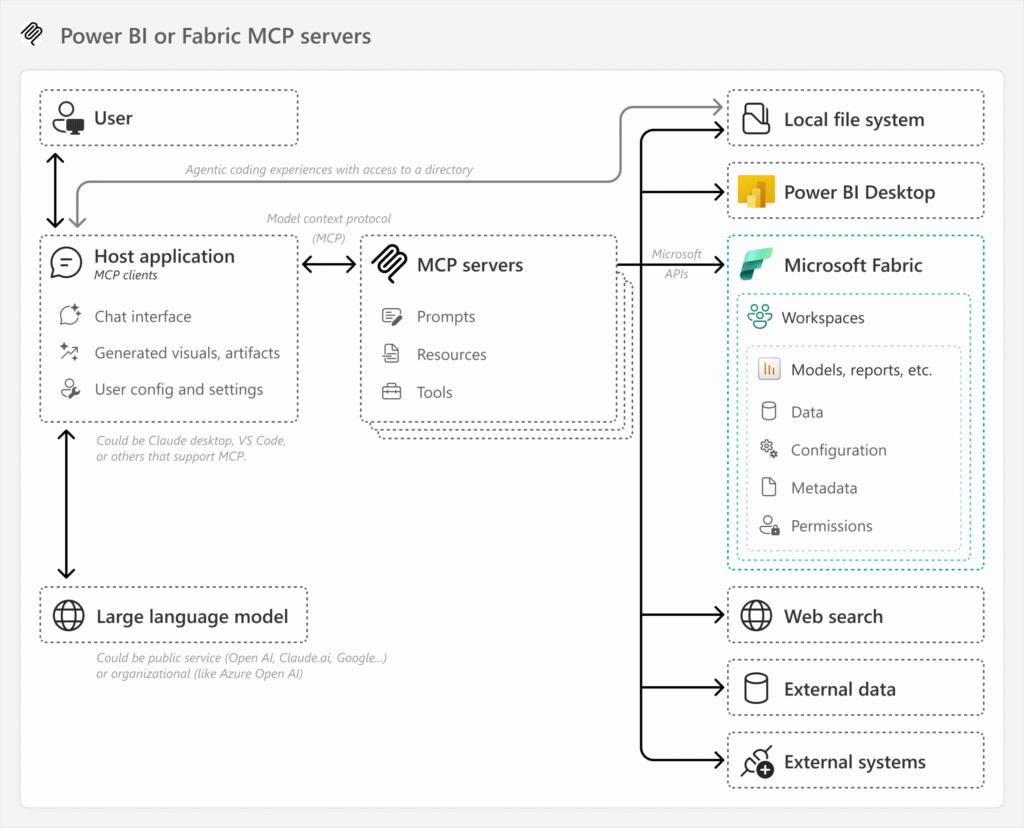
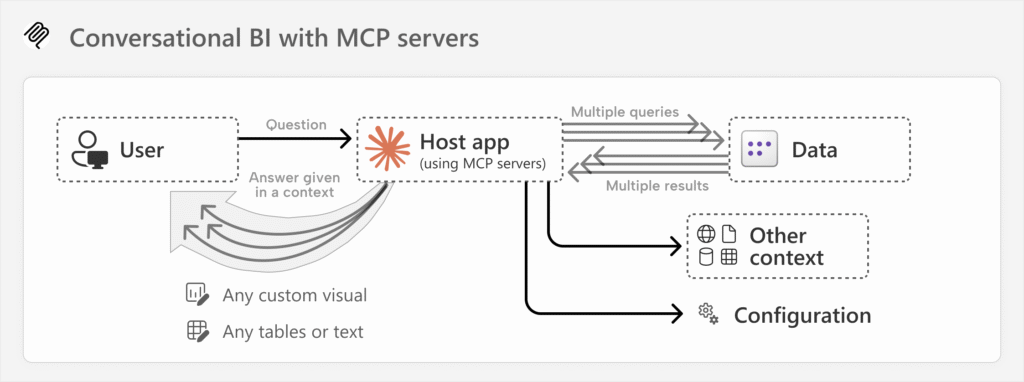
MCP servers are a pivotal innovation, enabling LLMs to control and query Power BI and Fabric environments. They use the open-standard Model Context Protocol to create secure, two-way connections between AI tools and data sources. Key capabilities include:
Natural Language Control: Manage workspaces, datasets, and reports using conversational prompts.
Schema Discovery: Retrieve metadata and schemas dynamically, aiding data exploration.
Action Execution: Perform create, read, update, and delete (CRUD) operations on Power BI and Fabric items.
Security: Use OAuth authentication and Microsoft’s first-party app registrations for secure access, though admins must monitor permissions to mitigate risks.
Security Considerations: While MCP servers are powerful, they pose risks if not properly managed. Open-source MCP servers can be easily installed, potentially allowing unauthorized actions if user permissions are not restricted. Admins should register apps in Azure, define API permissions, and avoid secret leakage to ensure secure operations.
AI and MCP servers in Power BI and Fabric are driving transformative outcomes. Below are detailed case studies showcasing their impact.
A retail chain with 200 stores struggled with inventory imbalances. Using AutoML, they built a demand forecasting model with 90% accuracy. An MCP server allowed their LLM to query, “Predict inventory needs for Q4,” updating the model in real-time. This reduced inventory costs by 20% and boosted sales by 10%.
A hospital network used Key Influencers to identify readmission risk factors, such as medication adherence. An MCP server enabled their LLM to query, “What drives readmissions in diabetic patients?” leading to targeted interventions that reduced readmissions by 15%.
A bank leveraged Key Influencers to assess loan default risks, identifying credit scores and payment history as key predictors. Using an MCP server, they asked their LLM to “Update risk models with new data,” reducing defaults by 10% in a year.
A logistics company used Q&A with an MCP server to monitor real-time delivery data. Queries like “Show today’s delayed shipments” generated instant visualizations, cutting delays by 20% and improving customer satisfaction.
A marketing agency used sentiment analysis to evaluate social media feedback. An MCP server enabled their LLM to query, “What are customers saying about our brand?” revealing key themes. This led to a 15% increase in campaign engagement.
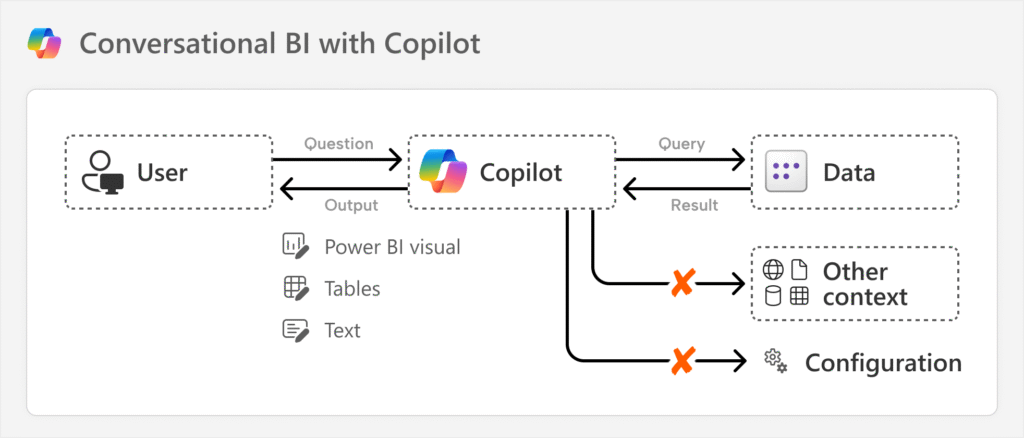
Ready to harness the power of AI in Power BI? Follow this step-by-step roadmap to implement these tools effectively and drive transformative results.
Download Power BI Desktop (free) or access the cloud-based service to experiment with AI features like Q&A and Key Influencers. Use Microsoft’s sample datasets, such as retail or financial data, to test their capabilities and understand their potential.
Integrate Power BI with your organization’s data sources, including Excel spreadsheets, SQL databases, cloud platforms (e.g., Azure, Google Cloud), or enterprise systems like Salesforce. Use Power Query to clean and transform data, ensuring it’s ready for AI analysis.
Start with AutoML to create a simple predictive model, such as forecasting sales or classifying customer segments. Power BI’s guided interface walks you through selecting data, training the model, and evaluating its performance, making it accessible even for beginners.
Create dashboards that incorporate AI visuals like Key Influencers, Q&A, and Smart Narratives. Customize them to focus on your key metrics, such as revenue growth, operational efficiency, or customer satisfaction. Add interactive filters to allow users to drill down into specific data points.
Conduct tailored training sessions to empower your team. Teach non-technical users how to use Q&A for ad-hoc queries, analysts how to build AutoML models, and executives how to interpret AI-driven insights. Consider online courses or Microsoft’s Power BI learning resources to supplement training.
Regularly review your dashboards and models to ensure they align with business goals. Add new data sources, refine predictions, and scale your solution as your organization grows. Schedule monthly or quarterly reviews to assess performance and identify opportunities for improvement.
For faster implementation and optimized outcomes, collaborate with a business intelligence expert. They can streamline data modeling, customize dashboards, and ensure seamless AI integration, delivering results in as little as 4 to 10 days.
AI in Power BI refers to the integration of artificial intelligence tools, including machine learning, natural language processing, and predictive analytics, into Microsoft’s Power BI platform. These features simplify complex data analysis, uncover actionable insights, and enable predictive modeling for users of all skill levels.
Organizations of all sizes and industries, from retail to healthcare to finance, can leverage AI in Power BI. Its intuitive tools, like Q&A and Smart Narratives, make advanced analytics accessible to non-technical users, while AutoML empowers analysts to build sophisticated models.
AI features like Key Influencers and AutoML identify critical trends and predict outcomes, enabling faster, data-driven decisions. For example, businesses have reduced decision-making time by up to 25% by leveraging real-time insights.
Industries such as retail, healthcare, finance, logistics, and marketing are adopting AI in Power BI to optimize operations, enhance customer experiences, and drive revenue growth. Its versatility makes it valuable for any data-driven sector.
Yes, Power BI’s AI features are designed to scale, efficiently processing millions of data points. Proper data modeling and optimization ensure real-time performance, even with complex datasets.
No, Power BI’s AI tools, including Q&A, Key Influencers, and AutoML, are designed for users without coding expertise. The platform’s intuitive interface makes advanced analytics accessible to all.
With a strategic approach, businesses can achieve measurable results in 4 to 10 days, particularly when partnering with experts for rapid deployment and optimization.
Power BI seamlessly integrates with Microsoft Azure, Office radial 365, and third-party platforms like Salesforce, SAP, and Google Cloud, creating a unified analytics ecosystem that enhances AI’s impact.
Power BI Desktop is free and includes many AI features, while Power BI Pro and Premium offer advanced capabilities for larger teams. For detailed pricing, visit Microsoft’s Power BI website.
AI in Power BI is not just a technological advancement—it’s a paradigm shift that empowers organizations to transform data into a strategic asset. From uncovering hidden insights to predicting future trends, its AI-driven tools deliver unparalleled value across industries. By embracing features like Key Influencers, Q&A, AutoML, and Smart Narratives, businesses can streamline operations, enhance decision-making, and gain a competitive edge.
The time to act is now. Start exploring AI in Power BI today, and unlock the full potential of your data to drive innovation, efficiency, and growth. Whether you’re building your first dashboard or scaling an enterprise solution, the future of analytics is within your reach.